
How to create a Photo Mosaic *Bernadette's Version*
Huwebes, Setyembre 23, 2010 @ 3:00 AM
*allow me to use my picture in this tutorial :)*

1. Open your picture and Go to Image>Adjustments>Threshold.

2. Create your own photo page. You can use Photoscape for that.

3. After creating your photo page, drag it in you photo (threshold). Change the size of the photo page to your desire. In this photo I use W: 47.6 H:43.9%.

4. Duplicate and nudge each photo page until it fully covers your original photo. Click Ctrl+Shift+E to merge the layers.

5. Go back to the threshold layer and delete the white background. You can use Magic Wand to select the white portions. Then delete.

6. Now,make the photo page layer visible and click add layer mask.

7. DONE!, you can add anything you like, backgrounds or text.
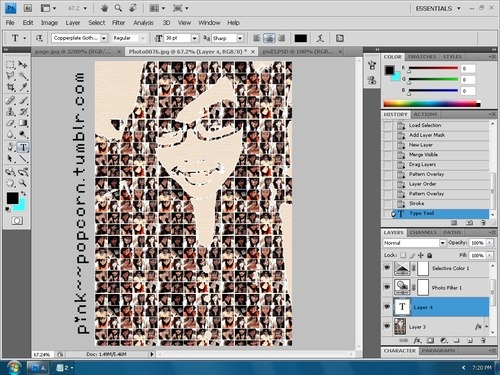
HOPE YOU ENJOY! :-*
(via pink--popcorn)
1. Open your picture and Go to Image>Adjustments>Threshold.
2. Create your own photo page. You can use Photoscape for that.
3. After creating your photo page, drag it in you photo (threshold). Change the size of the photo page to your desire. In this photo I use W: 47.6 H:43.9%.
4. Duplicate and nudge each photo page until it fully covers your original photo. Click Ctrl+Shift+E to merge the layers.
5. Go back to the threshold layer and delete the white background. You can use Magic Wand to select the white portions. Then delete.
6. Now,make the photo page layer visible and click add layer mask.
7. DONE!, you can add anything you like, backgrounds or text.
HOPE YOU ENJOY! :-*
(via pink--popcorn)